Most creators stop too early.
They open Canva.
They type a keyword.
They see templates.
They feel excited.
And then?
They design one pin and hope for traffic.
That’s the mistake.
Pinterest Keyword Research Using Canva is powerful – but only if you know how to convert that research into structured, strategic content.
In this post, I’m going to show you:
- The validation layer inside Canva
- The expansion layer most people miss
- The content structuring formula
- The 10-pin multiplication method
- The ranking psychology behind seasonal keywords
No fluff. Just execution.
Step 1: Understanding What Canva Is Really Showing You
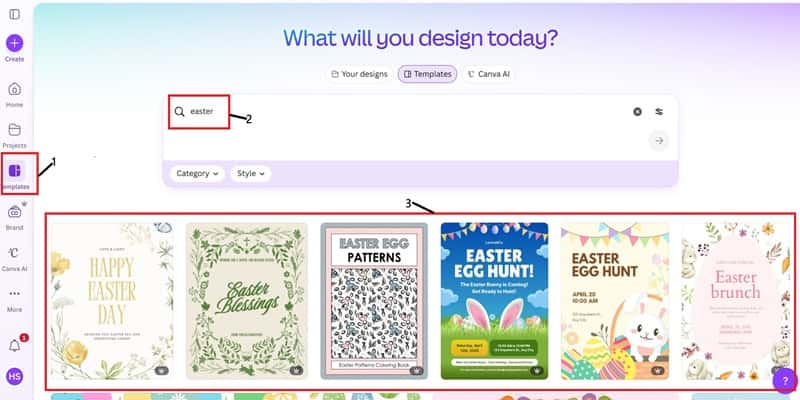
When you type a keyword like “Easter” inside Canva’s template search, you’re not just browsing design ideas.
You’re looking at demand signals.
Think about this.
Canva is a billion-dollar company. They do not build random templates. They build templates based on user behavior.
If you see:
- Easter Hunt
- Easter Brunch
- Easter Egg Pattern
- Easter Blessings
That means people are actively creating content around those themes.
Templates exist because demand exists.
This is market validation before you even touch Pinterest.
That’s the first layer of Pinterest Keyword Research Using Canva.
Validation before competition analysis.
Step 2: Why Most People Still Don’t Rank
Here’s where people mess up.
They take “Easter Hunt” and create one blog post titled:
“Easter Hunt Ideas”
Too broad.
Too competitive.
Too generic.
Pinterest rewards specificity.
You must break broad keywords into long-tail content clusters.
Instead of:
Easter Hunt Ideas
You want:
- Easter Hunt Ideas for Toddlers Indoors
- Easter Hunt Clues Printable PDF
- Backyard Easter Hunt Setup on Budget
- Easter Scavenger Hunt for Classroom
See the difference?
Broad = crowded
Specific = opportunity
Pinterest Keyword Research Using Canva is only step one.
Now we expand.
Step 3: The Keyword Expansion Framework
Here’s exactly how I do it.
- Find a validated template keyword inside Canva.
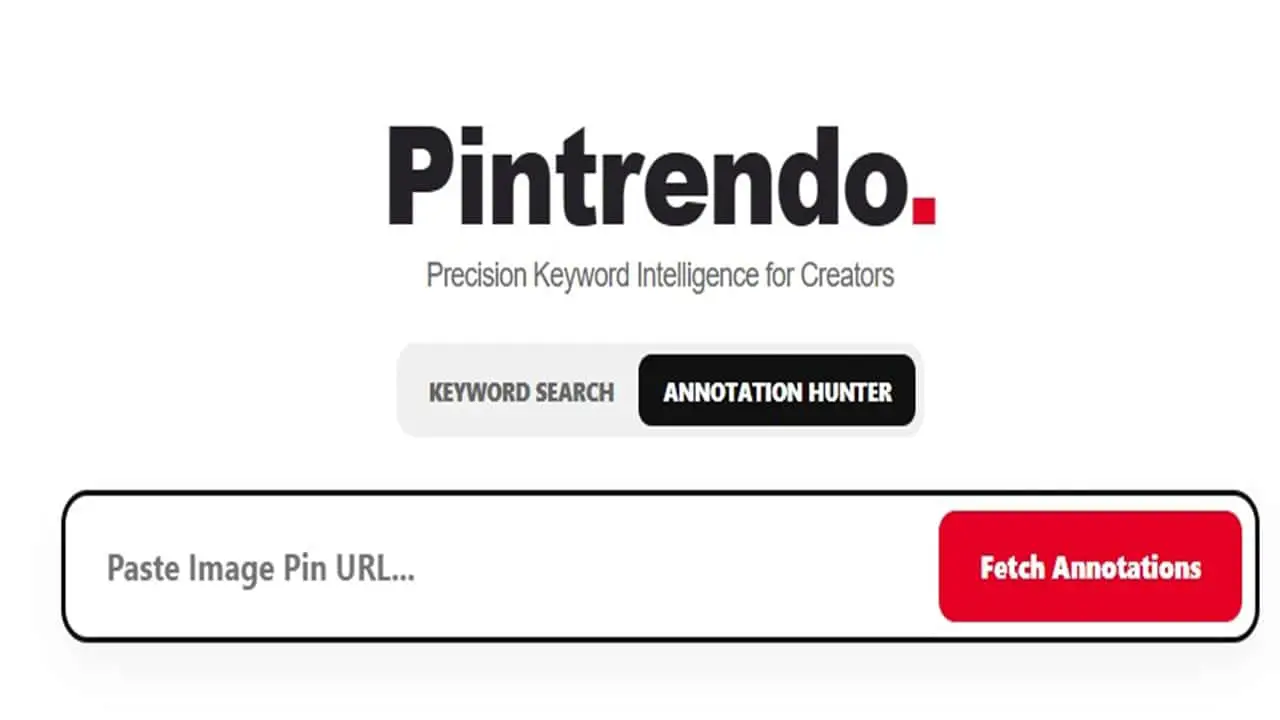
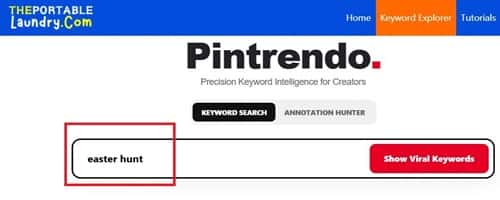
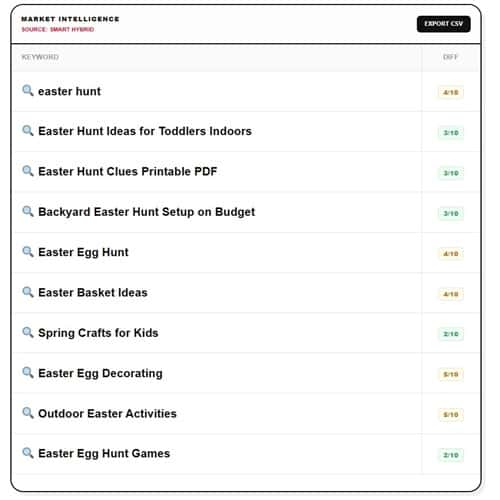
- Take that phrase to Pintrendo – Pinterest Keyword Tool.
- Look at the keyword suggestions and select the one that has a “Low difficulty” score.
- Then enter the shortlisted phrase in Pinterest and then study the top pins.
- Look at wording patterns.
You’re not guessing.
You’re reverse engineering language patterns.
If you do this via traditional pinterest search, you can start by typing the seed keyword and learning the pattern (Pintrendo eases this out and only suggests something you can easily rank for).
For example:
“Easter Hunt”
Pinterest might suggest:
- Easter Hunt Ideas for Kids
- Easter Hunt Clues
- Easter Hunt Prizes
- Easter Hunt Indoor
That’s your content roadmap.
Each suggestion can become:
- A standalone blog post
- Or a content section
- Or a dedicated pin angle
Now we’re stacking intent.
Step 4: The Blog Post Structure That Converts on Pinterest
This is where most people fail.
Pinterest does not rank “good articles.”
It ranks clear intent.
Here’s the blog structure I follow:
1. Intent-Driven Headline
Not:
Cute Easter Hunt Ideas
But:
15 Indoor Easter Hunt Ideas for Kids (Easy & Budget-Friendly)
Why?
Because Pinterest users scan fast.
Clarity wins.
2. Strong Opening Paragraph (First 100 Words Matter)
Pinterest reads context.
Use your main keyword naturally in the first 100 words.
Don’t stuff it.
Blend it.
Mention:
- Easter Hunt Ideas
- Indoor Easter Activities
- Kids Easter Games
- Budget-Friendly Easter
Layer related phrases naturally.
3. Subheadings That Mirror Search Intent
Every H2 should feel like a search query.
Example:
- How to Set Up an Indoor Easter Hunt
- Best Easter Hunt Clues for Toddlers
- Cheap Easter Hunt Prize Ideas
- Creative Backyard Easter Hunt Themes
Each subheading = potential long-tail ranking opportunity.
This is strategic structuring.
Here’s the example article which I have managed to nail it and guess what, it’s performing extremely well on Pinterest (I don’t just write theories, I show things that have worked for me and there is no reason why it won’t work for you…).
Step 5: The 10-Pin Multiplication Strategy
Now this is where real growth happens.
Let’s say your blog post is:
Indoor Easter Hunt Ideas for Kids
You don’t create one pin.
You create 10 variations.
Here’s how I break it down:
- Problem-focused angle
“Rainy Day Easter Hunt Ideas” - Age-specific
“Easter Hunt for Toddlers” - Budget angle
“$10 Easter Hunt Setup” - Emotional angle
“Make This Easter Magical for Kids” - Checklist angle
“Indoor Easter Hunt Setup Guide” - Printable angle
“Free Easter Hunt Clues” - Visual-heavy angle
“Cute Easter Hunt Setup Ideas” - Parent-hack angle
“Stress-Free Easter Morning Plan” - Quick solution
“10-Minute Easter Hunt Setup” - Classroom version
“Easter Hunt Ideas for Preschool”
Same blog post.
Different pin psychology.
That’s traffic stacking.
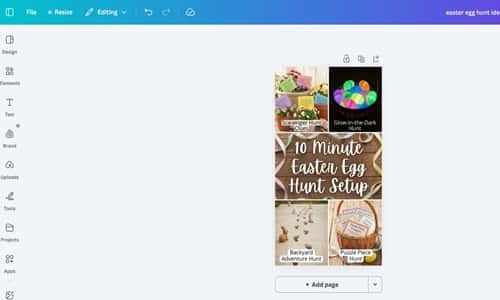
Here’s a quick example of my top performing pin…
Step 6: Pinterest Psychology Most Creators Ignore
Pinterest is not Instagram.
It is not TikTok.
It is a visual search engine.
People are planning something.
They are not scrolling for entertainment.
They want:
- Ideas
- Solutions
- Printable
- How-to
- Setup guides
If your content doesn’t signal outcome, it won’t convert.
That’s why “Pinterest Keyword Research Using Canva” works so well.
Because Canva templates already reflect what people are planning.
You’re tapping into behavior patterns.
Step 7: The Hidden Mistake That Kills Reach
Here’s something most people never realize.
They find the keyword.
They write the blog.
They design the pin.
But they mismatch messaging.
Example:
Blog Post: Indoor Easter Hunt Ideas for Toddlers
Pin Title: Cute Easter Ideas
Mismatch.
Pinterest reads relevance between:
- Pin title
- Pin description
- Landing page headline
If alignment is weak, distribution slows down.
Everything must echo the same core intent.
Alignment increases ranking probability.
Step 8: Seasonal Urgency Strategy
Seasonal keywords like Easter move fast.
Here’s how I approach it.
Instead of publishing 1 week before Easter…
I publish 6–8 weeks before.
Pinterest needs indexing time.
Then I create pins gradually over 2–3 weeks.
Not all at once.
Drip feed.
This increases distribution cycles.
Pinterest Keyword Research Using Canva gives you early signals.
Seasonal templates start appearing months before peak demand.
That’s your cue.
Step 9: Turning One Keyword Into a Content Cluster
Let’s map it clearly.
Main Keyword:
Easter Hunt Ideas
Cluster Breakdown:
Post 1:
Indoor Easter Hunt Ideas for Kids
Post 2:
Outdoor Backyard Easter Hunt Setup
Post 3:
Easter Hunt Clues Printable
Post 4:
Easter Hunt Prizes for Different Age Groups
Post 5:
Easter Scavenger Hunt for Classroom
That’s authority building.
Instead of random content…
You build topical depth.
Pinterest loves topical authority.
Step 10: The Execution Plan (Do This This Week)
If you’re serious, do this:
- Open Canva.
- Search 3 seasonal keywords.
- Write down 5 template variations for each.
- Expand the seed keyword in Pintrendo to figure out the low competition topics.
- Create one focused blog post.
- Design 5 – 10 pin variations.
- Publish early.
Repeat weekly.
Consistency compounds.
Why This Method Works Long Term
Because you’re not chasing trends blindly.
You’re validating demand.
Then expanding intent.
Then structuring content strategically.
Then multiplying distribution.
Pinterest Keyword Research Using Canva is not just about finding keywords.
It’s about building content with proof of demand before you invest time designing.
That reduces guesswork.
And when guesswork reduces, confidence increases.
Final Thoughts
Traffic doesn’t come from creativity alone.
It comes from alignment.
Alignment between:
- Demand
- Keyword
- Content structure
- Visual presentation
- Publishing timing
Most creators design first and think later.
You research first.
Then design with purpose.
That small shift changes everything.
If you implement this framework exactly as explained, you won’t just create pins.
You’ll build strategic assets that compound season after season.
And that’s when Pinterest starts working for you – instead of you constantly chasing it.