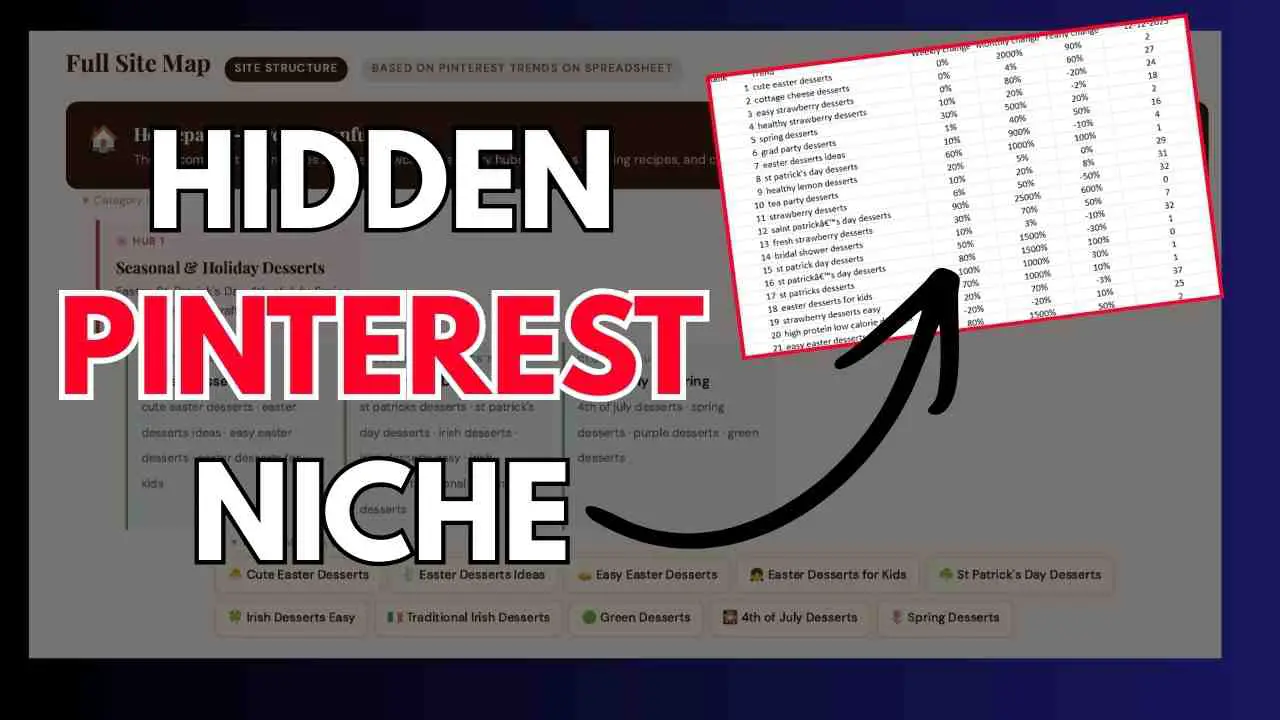
If you’re struggling to get traction on Pinterest, the problem isn’t your content, it’s your keywords.
While 97% of Pinterest searches are unbranded, most creators miss this opportunity by using generic or irrelevant keywords.
After implementing these exact Pinterest keyword research methods, I grew my monthly Pinterest traffic from 500 to 68,315 visitors.
In this comprehensive guide, I’ll show you exactly how to find high-performing Pinterest keywords using proven methods, including my own Pinterest Keyword Tool (Pintrendo).
Table of Contents
- Understanding Pinterest Keyword Fundamentals
- Where to Find Pinterest Keywords: 5 Proven Methods
- Method 1: Using Pinterest Native Tools
- Method 2: Pinterest Keyword Research Using Canva
- Method 3: Pinterest Keyword Research Using Etsy
- Method 4: Pinterest Keyword Research Using Amazon
- Method 5: Using Google & Other Search Engines
- Method 6: Competitor Analysis
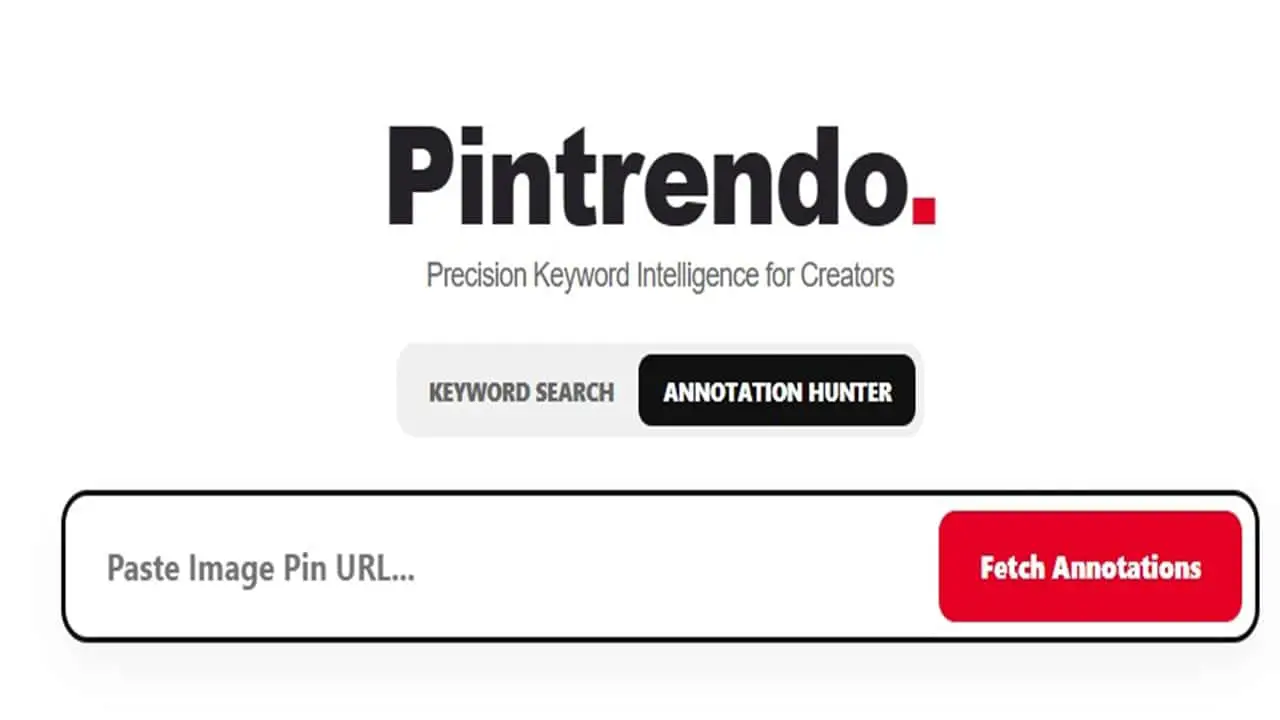
- Method 7: Using Pintrendo for Advanced Research
- My Complete Pinterest Keyword Research Framework
- Best Practices & Advanced Tips
- Tools & Resources
- Related Pinterest Keyword Guides
- Frequently Asked Questions
Understanding Pinterest Keyword Fundamentals
Before diving into keyword research methods, you need to understand how Pinterest search actually works – and why it’s fundamentally different from Google.
Pinterest is a Visual Search Engine, Not Social Media
Pinterest processes over 5 billion searches every month. Unlike Instagram or Facebook where discovery happens through hashtags and followers, Pinterest operates like Google: users type in specific search queries to find solutions. Your content gets discovered through search ranking, not through your follower count.
This means keywords are the foundation of your Pinterest strategy. Without the right keywords, your pins simply won’t be found – no matter how beautiful they are.
Types of Pinterest Keywords
Keywords on Pinterest appear in five critical places:
- Pin Titles – The most important keyword placement (40-100 characters)
- Pin Descriptions – Where you can naturally weave in 2-3 keyword variations (200-500 characters)
- Board Names – Must be descriptive and keyword-rich, not cute or vague
- Board Descriptions – Explain what your board covers using relevant keywords (150-500 characters)
- Profile Keywords – Your bio and profile name should include your niche keywords
Important: Hashtags on Pinterest have minimal impact compared to these five placements. Don’t rely on hashtags as your primary keyword strategy.
Understanding Keyword Intent on Pinterest
Pinterest users search with three types of intent:
- Inspirational Intent: Users seeking ideas and inspiration (Example: “wedding hairstyles,” “living room decor ideas”)
- Informational Intent: Users looking to learn something (Example: “how to start a blog,” “watercolor painting tutorial”)
- Transactional Intent: Users ready to purchase or take action (Example: “buy handmade jewelry,” “download budget planner printable”)
Understanding intent helps you choose the right keywords for your goals. If you sell products, prioritize transactional keywords. If you’re a blogger driving traffic, focus on informational keywords.
Where to Find Pinterest Keywords: 5+ Proven Methods
You don’t need expensive tools to find keywords that work. Here are six proven methods, from beginner-friendly to advanced, including my proprietary tool Pintrendo.
| Method | Difficulty | Cost | Best For |
|---|---|---|---|
| Pinterest Native Tools | Beginner | Free | Getting started, finding trends |
| Canva | Beginner | Free | Visual creators, quick research |
| Etsy | Intermediate | Free | Product sellers, specific niches |
| Google Tools | Intermediate | Free | Cross-platform strategy |
| Competitor Analysis | Advanced | Free | Established accounts |
| Pintrendo | Beginner-Advanced | FREE | Complete keyword analysis with annotations |
Let’s dive into each method step-by-step.
Method 1: Using Pinterest’s Built-In Keyword Research Tools
The best keyword research tool is free and already on Pinterest. Here’s how to use it like a pro.
Pinterest Search Bar Autocomplete
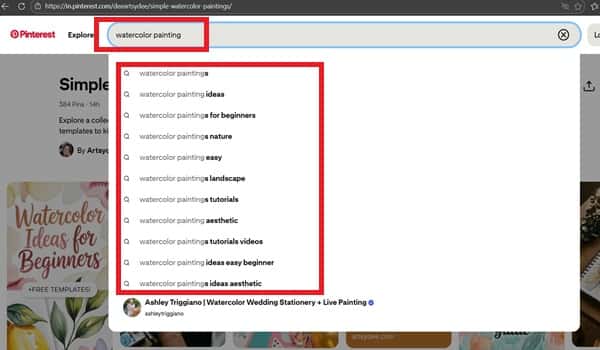
This is the fastest way to discover what people are actually searching for on Pinterest.
Step-by-step process:
- Open Pinterest (use incognito mode for unbiased results)
- Type your seed keyword in the search bar
- Notice the autocomplete suggestions that appear
- Screenshot or write down these suggestions
- Test variations of your keyword (singular, plural, with modifiers)
Example: Type “watercolor painting” and you’ll see suggestions like:
- watercolor painting for beginners
- watercolor painting easy
- watercolor painting ideas
- watercolor painting tutorial
- watercolor painting techniques
These autocomplete suggestions are pure gold – they represent actual searches people are making right now.
Pinterest Trends Tool
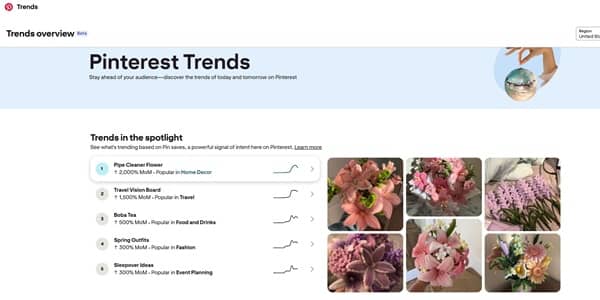
Pinterest Trends (trends.pinterest.com) shows you search volume over time and helps you identify seasonal opportunities.
How to use it:
- Go to trends.pinterest.com
- Enter your keyword
- Review the graph showing search volume over the past 12 months
- Note when searches peak (this tells you when to start pinning)
- Check related trending searches at the bottom
Limitations to know: Pinterest Trends is currently only available in the US, UK, and Canada. It shows relative interest (not absolute numbers), and very niche keywords may not have enough data.
Guided Search & Related Searches
After performing a search, Pinterest shows “guided search” bubbles at the top of results and “related searches” at the bottom. These reveal long-tail keyword variations.
How to mine these:
- Search for your main keyword
- Click through the guided search bubbles to see what refines your search
- Scroll to the bottom to see “Related searches”
- Each bubble represents a keyword combination that’s working
- Refresh your top pins every 90 days with updated keywords
- Use natural language – write for humans first, optimize for Pinterest second
- Test seasonal variations of evergreen keywords (“easy dinner recipes” vs. “easy Thanksgiving side dishes”)
- Save high-performing pins to multiple relevant boards to maximize reach
Method 2: Pinterest Keyword Research Using Canva
Canva’s Pinterest templates reveal what keywords designers are optimizing for – and what’s currently trending in visual content.
Why This Works
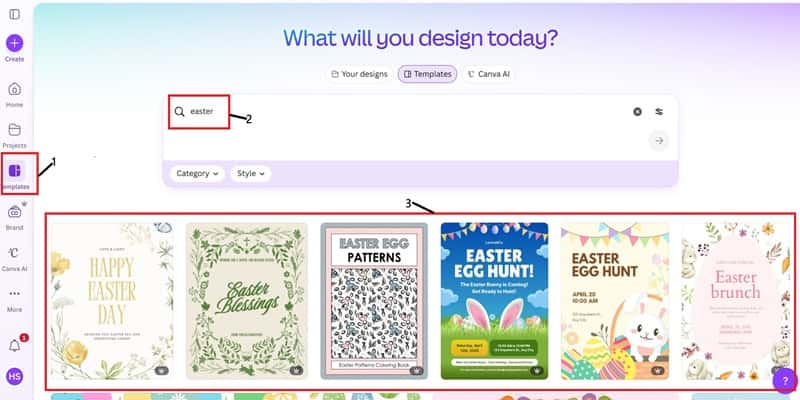
Canva template creators optimize their titles and descriptions for searchability. When you see thousands of templates for “minimalist wedding invitations” or “boho Instagram stories,” you know these are popular search terms.
Quick Overview of the Process
- Go to Canva.com
- Search for “Pinterest pin” or your specific niche
- Look at the titles and descriptions of popular templates
- Extract keywords from the most-used templates
- Cross-reference these keywords on Pinterest to verify they work
When to Use This Method
This method works best if:
- ✅ You’re a visual creator (artist, designer, photographer)
- ✅ You want quick keyword inspiration without deep research
- ✅ You’re in creative niches like design, DIY, or crafts
Limitations
- Not industry-specific beyond creative fields
- Template trends lag actual Pinterest trends by several weeks
- Better for inspiration than data-driven decisions
🎯 Want the Complete Canva Framework?
This is just the overview. For my complete Canva keyword research framework with real examples and a downloadable template, read:
→ Pinterest Keyword Research Using Canva + My Exact Framework
Method 3: Pinterest Keyword Research Using Etsy Search
Pinterest is a major traffic source for Etsy sellers, which means what ranks on Etsy often performs exceptionally well on Pinterest.
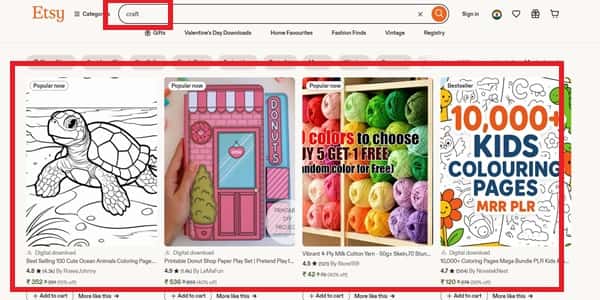
Why Etsy and Pinterest Are Connected
Etsy’s search algorithm prioritizes similar factors to Pinterest: keyword relevance, engagement signals, and user behavior. More importantly, Etsy’s search data comes from real buyers with purchase intent – exactly the audience you want on Pinterest.
Who Should Use This Method
This strategy is perfect for:
- ✅ E-commerce sellers and Etsy shop owners
- ✅ Handmade product creators
- ✅ Print-on-demand sellers
- ✅ Anyone in visual product niches (jewelry, home decor, stationery)
The Basic Process
- Go to Etsy.com and search for your product or niche
- Note the autocomplete suggestions (these reveal popular searches)
- Click on top-selling listings in your niche
- Analyze their titles – what keywords do they use?
- Read their descriptions and extract keyword phrases
- Test these keywords on Pinterest search to verify they work there too
🎯 Ready for the Deep Dive?
I break down my exact step-by-step Etsy-to-Pinterest keyword framework, complete with case study examples:
→ Pinterest Keyword Research Using Etsy (Pinterest Strategy)
Method 4: Pinterest Keyword Research Using Amazon
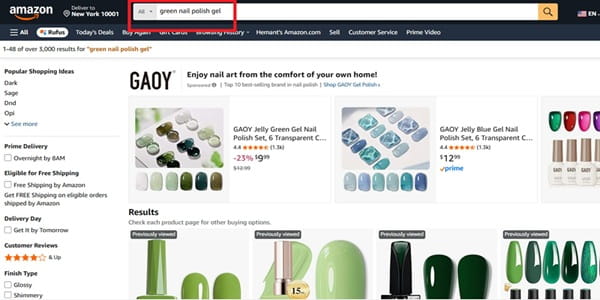
Most people start Pinterest keyword research inside Pinterest.
I don’t.
I start with Amazon, if my goal is to sell Amazon product as an affiliate (but only the ones that have decent demand on Pinterest).
Why? Because Amazon shows what people are already buying. That’s real demand. Then I validate that demand on Pinterest to make sure it has visual search volume. When both line up, you’ve found a high-intent opportunity.
Here’s the simple framework:
- Search a broad niche term on Amazon (like “green gel polish”).
- Analyze autocomplete suggestions and top product listings.
- Extract repeated buyer-focused phrases.
- Validate the keyword on Pinterest (autosuggest + related searches).
- Use a tool like Pintrendo to uncover underserved long-tail angles.
- Build a focused blog post and support it with multiple pin variations.
This method bridges buyer intent with search intent – which is where conversions happen.
🎯 Ready for the Deep Dive?
Here’s my exact step-by-step Amazon-to-Pinterest keyword research framework, complete with examples:
→ Pinterest Keyword Research Using Amazon (Pinterest Strategy)
Method 5: Using Google for Pinterest Keyword Ideas
Cross-platform keyword alignment helps you rank in both Google and Pinterest ecosystems, maximizing your content’s reach.
Why Google Matters for Pinterest
Many Pinterest users search on Google first, then refine their search on Pinterest. By optimizing for keywords that work on both platforms, you create multiple discovery paths to your content.
Google Autocomplete Technique
- Type your seed keyword into Google search
- Note the autocomplete suggestions
- Compare these with Pinterest autocomplete
- Find overlapping keywords – these work on both platforms
Answer The Public
Answer The Public (answerthepublic.com) is a free tool that visualizes question-based searches around any keyword.
How to use it for Pinterest:
- Enter your niche keyword
- Review the “questions” section (how, what, why, where, when)
- These question-based keywords work excellently for blog content that you’ll promote on Pinterest
- Export the data for future reference
Google Keyword Planner
While designed for Google Ads, Keyword Planner can inform your Pinterest strategy.
How to access for free:
- Create a free Google Ads account
- Navigate to Tools → Keyword Planner
- Enter your keywords
- Review search volume estimates and related keywords
Important caveat: Google search volume doesn’t directly translate to Pinterest volume, but it indicates general interest in topics.
When This Method Shines
Use Google tools when you’re:
- Combining blogging with Pinterest strategy
- Creating informational or tutorial content
- Building topical authority across multiple platforms
- Targeting users who search on Google before Pinterest
Method 6: Analyzing Competitor Keywords (Advanced)
Your successful competitors have already done the testing. Learn from their wins without reinventing the wheel.
The Manual Competitor Analysis Method
Step 1: Identify 5-10 Top Accounts in Your Niche
- Look for verified accounts or those with 10k+ followers
- Prioritize accounts with recent, consistent growth
- Choose accounts that target your exact audience
Step 2: Analyze Their Top-Performing Pins
- Visit their profile and sort by “Most popular”
- Screenshot their highest engagement pins (most saves/comments)
- Extract keywords from pin titles and descriptions
- Note what these pins have in common
Step 3: Study Their Board Structure
- Board names are keyword goldmines – they reveal primary keywords
- Board descriptions show their keyword strategy
- Note how they organize content (this reveals their content pillars)
Step 4: Document Patterns in a Spreadsheet
- Which keywords appear repeatedly across their top pins?
- What style of descriptions performs best? (short vs long, casual vs professional)
- Which calls-to-action do they use?
- What’s their pin design style?
Tools That Help with Competitor Analysis
- Pinterest Analytics (free) – Track your own performance to understand what works
- Tailwind (paid) – Offers competitor monitoring features
- Manual spreadsheet tracking (free) – Sometimes the old-fashioned way is best
Ethical Considerations
What you SHOULD do:
- ✅ Learn from their keyword strategy
- ✅ Find keyword gaps they’re missing
- ✅ Understand what resonates with your shared audience
- ✅ Use similar keywords with your unique spin
What you should NEVER do:
- ❌ Copy their pin descriptions verbatim
- ❌ Duplicate their exact board structure
- ❌ Steal their visual designs
- ❌ Use their branded keywords
Method 7: Using Pintrendo for Advanced Pinterest Keyword Research
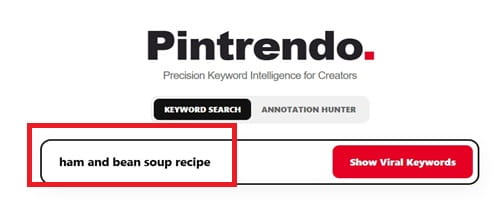
While the methods above are powerful, I created Pintrendo to solve a critical gap: getting Pinterest-specific keyword data with annotations that explain what’s actually working and why.
What is Pintrendo?
Pintrendo is my proprietary Pinterest keyword research tool that goes beyond basic autocomplete suggestions. It provides:
- Pinterest-Specific Search Volume Data – Unlike generic SEO tools, Pintrendo pulls actual Pinterest search data
- Keyword Annotations – Context about each keyword: seasonal trends, competition level, and content type recommendations
- Long-Tail Keyword Discovery – Find specific, low-competition keywords that larger tools miss
- Trend Analysis – See when keywords peak and when to start pinning for maximum reach
- Niche-Specific Suggestions – Get keyword recommendations tailored to your specific industry
Why I Built Pintrendo
After years of manually researching keywords using the free methods above, I realized I was spending 5-10 hours per month on keyword research. I needed:
- Faster keyword discovery without sacrificing quality
- Pinterest-specific data (not Google Keyword Planner estimates)
- Context around each keyword (not just a number)
- Seasonal trend predictions so I could plan content 3-6 months ahead
That’s when I created Pintrendo – to automate the time-consuming parts while providing insights that free tools can’t match.
How to Use Pintrendo for Keyword Research
Step 1: Enter Your Seed Keyword
Start with a broad keyword in your niche (e.g., “watercolor painting,” “healthy recipes,” “home organization”).
Step 2: Review Keyword Suggestions with Annotations
Pintrendo returns a list of related keywords along with critical annotations:
- Search Volume Indicator: High, Medium, or Low monthly searches
- Competition Level: How difficult it is to rank for this keyword
- Annotations: To see what Pinterest thinks of top ranking pin for a specific keyword
Step 4: Export and Implement
Export your keyword list to a spreadsheet. You can do the same for annotations as well.
Pintrendo vs. Free Methods: When to Use Each
| Scenario | Use Free Methods | Use Pintrendo |
|---|---|---|
| You’re just getting started | ✅ | – |
| You have 1-2 hours for research | ✅ | – |
| You need quick keyword ideas | ✅ | – |
| You’re planning 3-6 months ahead | – | ✅ |
| You manage multiple Pinterest accounts | – | ✅ |
| You want Pinterest-specific volume data | – | ✅ |
| You need to understand seasonal trends | – | ✅ |
| You value time over manual work | – | ✅ |
Real Example: Keyword Research with Pintrendo
Seed Keyword: “watercolor painting”
Pintrendo Results (sample):
| Keyword | Volume | Competition | Seasonality | Annotation |
|---|---|---|---|---|
| watercolor painting for beginners | High | Medium | Evergreen (slight January spike) | Tutorial content performs best. Use in pin titles. |
| easy watercolor flowers | Medium | Low | Peaks March-May (spring) | Great for step-by-step content. Start pinning in January. |
| watercolor landscape tutorial | Medium | Medium | Evergreen | Video tutorials get highest engagement. Ideal for board names. |
| simple watercolor painting ideas | High | High | Evergreen | Inspirational intent. Works well for list-style pins (e.g., “10 Simple Ideas”). |
Actionable Insight from Pintrendo: “Easy watercolor flowers” has medium volume and low competition with a clear seasonal trend. If you create a tutorial in January targeting this keyword, you’ll rank by March when searches peak – perfect for capturing seasonal traffic.
🚀 Try Pintrendo for Your Niche
Stop spending hours on manual keyword research. Get Pinterest-specific data with actionable annotations in minutes.
My Complete Pinterest Keyword Research Framework
Now that you know the individual methods, here’s how to combine them into a systematic process you can repeat for every niche, product, or content pillar.
Step 1: Define Your Niche & Content Pillars
What to do:
- Write down your main niche or topic
- Break it into 3 to 5 content pillars (subtopics)
- Create a simple spreadsheet to organize your research
Example:
Main Niche: Productivity for Entrepreneurs
Content Pillars:
- Time management
- Goal setting
- Morning routines
- Focus techniques
- Productivity tools
Step 2: Generate Seed Keywords
What to do:
- List 5-10 broad keywords for each content pillar
- Include obvious terms your audience would use
- Think like your audience – use their language, not industry jargon
Example for “Morning Routines” pillar:
- morning routine
- morning habits
- wake up routine
- productive mornings
- morning schedule
Step 3: Expand with Research Methods
What to do:
- Run each seed keyword through all the methods above (or use Pintrendo to automate this)
- Pinterest autocomplete → list all suggestions
- Canva → note trending template keywords
- Etsy → if product-focused, check what’s selling
- Google → find question-based variations
- Competitors → identify keywords they’re ranking for
- Pintrendo → get volume data and annotations
Time investment: 30-45 minutes per content pillar (or 5-10 minutes with Pintrendo)
Step 4: Organize & Prioritize Keywords
What to do: Create a master spreadsheet with these columns:
- Keyword
- Search Volume (High/Medium/Low based on autocomplete frequency or Pintrendo data)
- Competition (How many results when searched? How competitive are top pins?)
- Intent (Inspirational/Informational/Transactional)
- Content Pillar
- Priority (High/Medium/Low)
- Notes
Prioritization criteria:
- ✅ High Priority: Strong autocomplete suggestions + low competition + matches your content perfectly
- ⚠️ Medium Priority: Some autocomplete suggestions + medium competition + good match
- ❌ Low Priority: No autocomplete + high competition + doesn’t align with your content
Step 5: Implement Across Your Pinterest Presence
Where to use your keywords:
Profile:
- Name field (if relevant to your brand)
- Bio/About section
- Website description
Boards:
- Board names (use primary keywords, be descriptive)
- Board descriptions (150-500 characters, keyword-rich)
Pins:
- Pin titles (40-100 characters, front-load keywords)
- Pin descriptions (200-500 characters, naturally include 2-3 keyword variations)
- Alt text (for accessibility + SEO bonus)
- Hashtags (3-5 max, highly relevant only)
Best practices for implementation:
- Front-load keywords: Place your most important keyword in the first 5-7 words of titles and descriptions
- Write naturally: Avoid keyword stuffing – it hurts readability and Pinterest penalizes it
- Use variations: Don’t repeat the exact same keyword 5 times; use natural variations
- Include calls-to-action: “Learn how,” “Get the free template,” “Save this for later”
Step 6: Track & Refine
What to track in Pinterest Analytics:
- Pin impressions (how many times your pins were seen)
- Which keywords drive traffic to your website
- Which boards perform best
- Seasonal trends in your niche
When to adjust your strategy:
- Quarterly: Review and refresh top pins with updated keywords
- Monthly: Check Pinterest Trends for new opportunities in your niche
- Weekly: Monitor what’s working and create more of it
Refinement process:
- Identify underperforming keywords (low impressions after 30 days)
- Test variations or related keywords
- Double down on winners – create more content around successful keywords
- Archive or delete pins that don’t perform after 90 days
📥 Download The Pinterest Blueprint Course
Get my complete step by step blueprint with:
✅ Innovative ways to perform keyword research
✅ Insights On How Pinterest Actually Works
✅ Writing Specifically for Pinterest
✅ Underground Techniques No One Shares
Pinterest Keyword Research Best Practices & Advanced Tips
Seasonal Keyword Planning
Why it matters: Pinterest users plan 3 to 6 months ahead for major events, seasons, and holidays.
How to plan your seasonal strategy:
- January: Research summer keywords (June-August content)
- April: Research fall and back-to-school keywords (September-October content)
- July: Research holiday keywords (November-December content)
- October: Research New Year and winter keywords (January-February content)
Example: Start pinning “Christmas cookie recipes” in September, not December. By December, the algorithm has already decided which pins will rank – you’re too late if you wait until then.
Long-Tail vs. Short-Tail Keywords on Pinterest
Short-tail keywords (1-2 words):
- Examples: “wedding ideas,” “healthy recipes,” “home decor”
- Pros: Very high search volume, broad reach
- Cons: Extremely competitive, vague intent, hard to rank
Long-tail keywords (3-5+ words):
- Examples: “rustic outdoor wedding ideas on a budget,” “easy healthy dinner recipes for picky eaters”
- Pros: Specific intent, less competition, higher conversion, faster results
- Cons: Lower individual search volume
Strategy: Use both strategically. Start with long-tail keywords to build authority and get quick wins. As you grow, gradually target more competitive short-tail keywords.
Keyword Density & Placement
Where keywords matter most (in order of importance):
- Pin Titles (Highest algorithmic weight)
- Board Names
- First 50 characters of pin description
- Board descriptions
- Hashtags (Minimal impact – don’t rely on these)
Optimal keyword density:
- Don’t stuff keywords unnaturally (Pinterest will penalize you)
- Aim for 2 to 3 keyword variations per pin description
- Primary keyword should appear in title + first sentence of description
A/B Testing Your Keywords
What to test:
- Create 2 pins for the same blog post/product with different keyword focuses
- Example: “Home office ideas” vs. “Small home office ideas on a budget”
- Track performance in Pinterest Analytics for 30 days
- Scale the winner by creating more variations
Common Keyword Mistakes to Avoid
- ❌ Keyword stuffing: Writing descriptions like “home decor home decor ideas home decorating home decoration”
- ❌ Using only broad keywords: “fitness” is too vague – get specific
- ❌ Ignoring Pinterest autocomplete: It’s your best free data source
- ❌ Not updating keywords: What worked in 2023 may not work in 2026
- ❌ Copying competitors exactly: Find your unique angle within the same keywords
- ❌ Focusing only on hashtags: Hashtags are the LEAST important keyword placement
– Refresh your top pins every 90 days with updated keywords
– Use natural language – write for humans first, optimize for Pinterest second
– Test seasonal variations of evergreen keywords (“easy dinner recipes” vs. “easy Thanksgiving side dishes”)
-Save high-performing pins to multiple relevant boards to maximize reach
Essential Pinterest Keyword Research Tools & Resources
Free Tools
- Pintrendo (autocomplete) – The #1 Free Pinterest Keyword Tool, shows real user search competition/keywords/underserved topics + it has most premium tools lack i.e. Annotations.
- Pinterest Search Bar (autocomplete) – The #1 free tool, shows real user searches
- Pinterest Trends (trends.pinterest.com) – Search volume over time, seasonal insights
- Canva – Template research for trending keywords
- Etsy – Product keyword research for sellers
- Google Keyword Planner – Supplementary data for cross-platform strategy
- Answer The Public (free tier) – Question-based keyword ideas
- Pinterest Analytics – Track your own performance data (requires business account)
My Recommendation
Start with 100% free tools. The methods I’ve outlined above are powerful enough to grow from 0 to 10,000+ monthly Pinterest visitors without spending a dime.
Invest in paid tools when:
- You’re getting consistent Pinterest traffic and want to scale faster
- You manage multiple Pinterest accounts
- Your time is worth more than the cost (Pintrendo saves 5-10 hours/month of research time)
- You have revenue to justify the investment
Templates & Worksheets
- 📥 Pinterest Keyword Research Template – Google Sheets tracker with formulas
- 📥 Content Calendar Template – Plan pins 3-6 months ahead
- 📥 Pinterest SEO Checklist – Ensure every pin is optimized
Related Pinterest Keyword Guides
This guide covered how to find Pinterest keywords. For comprehensive lists of proven keywords in specific niches, check out these related resources:
🔗 Explore More Pinterest Keyword Resources
→ Top Pinterest Keywords by Niche (Updated Weekly)
Browse 500+ high-performing keywords organized by industry: artists, bloggers, e-commerce, service providers, and more.
→ Pinterest Keyword Research Using Canva + My Exact Framework
Deep dive into using Canva for keyword research with step-by-step examples and templates.
→ Pinterest Keyword Research Using Etsy (Pinterest Strategy)
My complete Step-By-Step framework for product sellers to extract winning keywords from Etsy.
Frequently Asked Questions About Pinterest Keyword Research
How often should I do Pinterest keyword research?
In-depth research: Every 3 months (quarterly)
Quick checks: Monthly using Pinterest Trends or Pintrendo
Seasonal research: 3-6 months before peak season
Example: If you’re in the wedding niche, research summer wedding keywords in January-February so you can start pinning in March.
How many keywords should I use per pin?
Quality over quantity. Aim for:
- 1 primary keyword in your pin title (front-loaded)
- 2-3 secondary/related keywords naturally woven into your description
- Total pin description length: 200-500 characters
Don’t force keywords. If your description reads awkwardly, both Pinterest’s algorithm and human readers will notice.
Do Pinterest keywords work like Google keywords?
Similarities:
- Both use search algorithms based on relevance
- Keywords in titles matter most for both platforms
- Long-tail keywords reduce competition
Differences:
- Pinterest is visual-first (pin design matters as much as keywords)
- Intent is often inspirational on Pinterest, not just transactional
- Pinterest users plan ahead 3-6 months (seasonality matters more)
- Hashtags matter very little on Pinterest vs. Instagram
- Pin engagement signals (saves, clicks) affect rankings more than backlinks do on Google
Can I use the same keywords as my competitors?
Yes, but with strategy:
- Use the same core keywords (you’re in the same niche, after all)
- Add your unique angle or specificity to stand out
- Differentiate with better design, content quality, or more specific long-tail variations
Example:
- Competitor: “Healthy breakfast ideas”
- You: “5-minute healthy breakfast ideas for busy moms”
Same core keyword, but your version is more specific and targets a particular audience.
How long until I see results from Pinterest keyword optimization?
Realistic timeline:
- 2-4 weeks: Pins indexed and starting to appear in search results
- 1-2 months: Traction on some keywords, initial traffic increases
- 3-4 months: Consistent traffic growth, ranking for medium-competition keywords
- 6+ months: Established authority, ranking for competitive short-tail keywords
Pinterest rewards consistency. Keep pinning quality content with optimized keywords, and the traffic will come.
Do I need paid tools to find good Pinterest keywords?
No. The best keyword research tool is free – Pinterest itself.
Start with these free methods:
- Pinterest autocomplete
- Pinterest Trends
- Manual competitor analysis
I personally grew to 50,000+ monthly Pinterest visitors using only free methods before I built Pintrendo.
Paid tools like Pintrendo are helpful when:
- You value time over money (saves 5-10 hours/month)
- You want Pinterest-specific volume data and trends
- You’re managing multiple accounts or clients
- You need keyword annotations and implementation guidance
Should I use different keywords for each pin of the same blog post?
Yes! This is called “pin variation strategy” and it’s crucial.
Example: You have a blog post titled “How to Start a Blog”
Create multiple pins with different keyword focuses:
- Pin 1: “How to start a blog for beginners” (targets beginners specifically)
- Pin 2: “How to start a blog and make money” (targets people interested in monetization)
- Pin 3: “Start a blog step by step 2026” (targets people wanting detailed process + current year)
- Pin 4: “Blogging for beginners complete guide” (alternative phrasing)
Each pin targets a slightly different search query, maximizing your reach across multiple keyword variations.
Ready to Dominate Pinterest Search?
You now have everything you need to find high-performing Pinterest keywords using six proven methods – from completely free strategies to advanced tools like Pintrendo.
Your Next Steps:
- Choose your starting method: Begin with Pinterest autocomplete (easiest) or use Pintrendo if you want data-driven insights immediately
- Pick one content pillar: Don’t try to research everything at once – start with your most important topic
- Spend 30-60 minutes researching: Use the framework in this guide to find 10-15 winning keywords
- Create 3-5 keyword-optimized pins this week: Apply what you learned immediately
- Track your results: Check Pinterest Analytics in 30 days to see what’s working
Remember: Pinterest keyword research isn’t one-and-done. The accounts that dominate Pinterest search are those that consistently refine their strategy based on performance data.
Keywords are the foundation, but combine them with high-quality pins, valuable content, and consistency – that’s the formula for Pinterest success.
📥 Get My Complete Pinterest Blueprint
Download the exact Pinterest Blueprint I use to organize my keyword research, including:
✅ Innovative ways to perform keyword research
✅ Insights On How Pinterest Actually Works
✅ Writing Specifically for Pinterest
✅ Underground Techniques No One Shares