If you’ve ever treated Pinterest like Google, you already know… it doesn’t behave the same.
I used to write blog posts, throw in a few “SEO keywords,” design a pretty pin, and hope for traffic.
Sometimes it worked.
Most times it didn’t.
Once I understood how Pinterest search actually works – and how annotations influence ranking.. In fact the whole Pinterest SEO – everything changed.
This guide will walk you step by step on How To Use Pintrendo Pinterest Keyword Tool:
- How Pinterest keywords work
- How people search on Pinterest
- How to use Pintrendo for keyword research
- How to use Annotation Hunter properly
- How to combine both for stronger ranking signals
No fluff. Just structure.
How Pinterest Keywords Are Different
Pinterest is a visual search engine.
It ranks based on:
- Search phrases typed into the search bar
- Autocomplete patterns
- Engagement signals
- Relevance context (annotations)
- Topic relationships
Unlike Google:
- Pinterest relies heavily on phrase matching.
- It prefers structured, long-tail keyword patterns.
- It reads contextual relationships between words.
That means you don’t just need a “main keyword.”
You need:
- Supporting phrases
- Context signals
- Closely associated terms
This is where most creators fail.
How People Actually Search on Pinterest
Pinterest users rarely type one word.
They type:
- “Fall front porch decor ideas”
- “Easy high protein breakfast meal prep”
- “Small balcony garden ideas apartment”
Notice something?
They search in phrases.
Descriptive. Intent-driven. Specific.
Pinterest autocomplete suggestions are based on real user behavior.
That’s why Pintrendo pulls directly from Pinterest behavior instead of third-party volume databases.
How to Use Pintrendo for Keyword Research
Let’s start with the foundation.
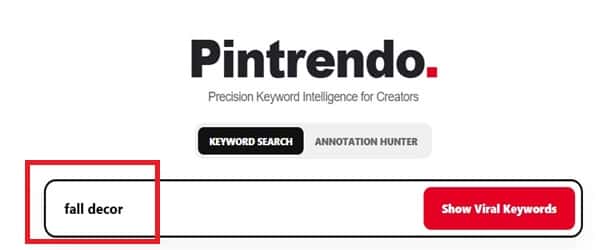
Step 1: Enter a Seed Keyword
Open Pintrendo.
Type in a broad seed keyword.
Example:
- “Fall decor”
- “High protein breakfast”
- “DIY wall art”
Keep it simple.
Step 2: Review the Keyword Suggestions
Pintrendo will show:
- Autocomplete variations
- Underserved topic opportunities
- Structured keyword phrases
Now look for:
- Specific long-tail phrases
- Clear intent
- Less saturated angles
You are not chasing volume.
You are identifying opportunity.
Choose one targeted phrase that feels:
- Specific
- Intent-based
- Expandable into content
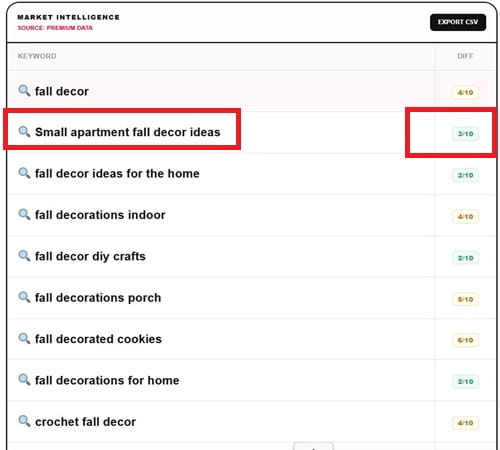
Example: Instead of “Fall decor,” you might pick:
“Small apartment fall decor ideas”
That’s your working keyword.
Next is validating the Keyword on Pinterest
This is critical. Do not skip this.
Tip: Notice when you search for keywords, there is a small search icon next to the suggested keywords, thats huge because when you click on it, it will open a whole new list of keywords meaning it will give you different keywords from side angles, literally allowing you to explore thousands of untapped keywords.
Step 3: Go to Pinterest Search
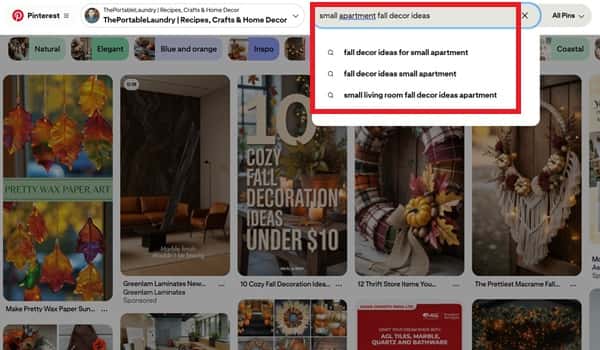
Open Pinterest.
Type the exact keyword you selected from Pintrendo.
Now observe:
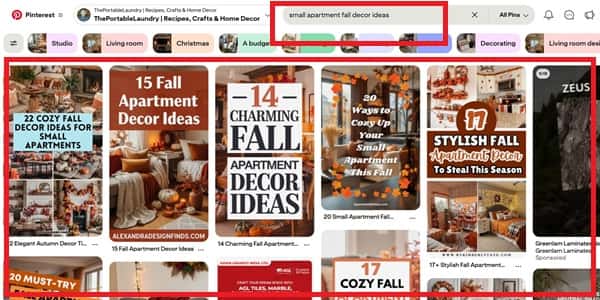
- What type of pins rank at the top?
- Are they blog pins?
- Are they idea pins?
- Are they product pins?
- What style dominates?
This tells you what Pinterest prefers for that query.
Using Annotation Hunter the Right Way
Now we move into the most overlooked ranking layer.
Annotations.
What Are Pinterest Annotations?
Annotations are contextual words and phrases Pinterest associates with a pin.
Think of them as semantic relationship signals.
They help Pinterest understand:
- What a pin is about
- What topics it connects to
- What related queries it may rank for
Annotations are not always visible publicly.
But Pinterest uses them internally to determine relevance.
And this is powerful.
How to Extract Annotations From Pinterest
Step 1: Take the URL of the Top Ranking Pin
From the search results of your chosen keyword:
- Click the #1 ranking pin.
- Copy its URL.
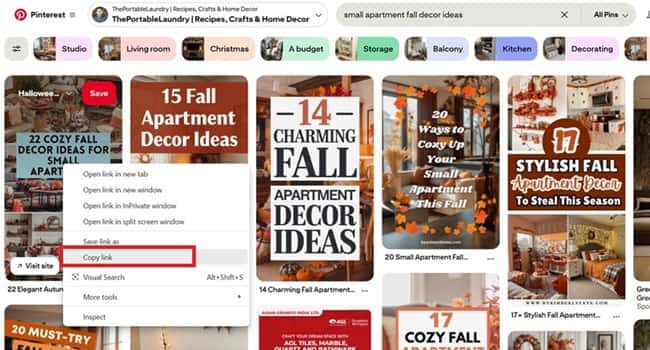
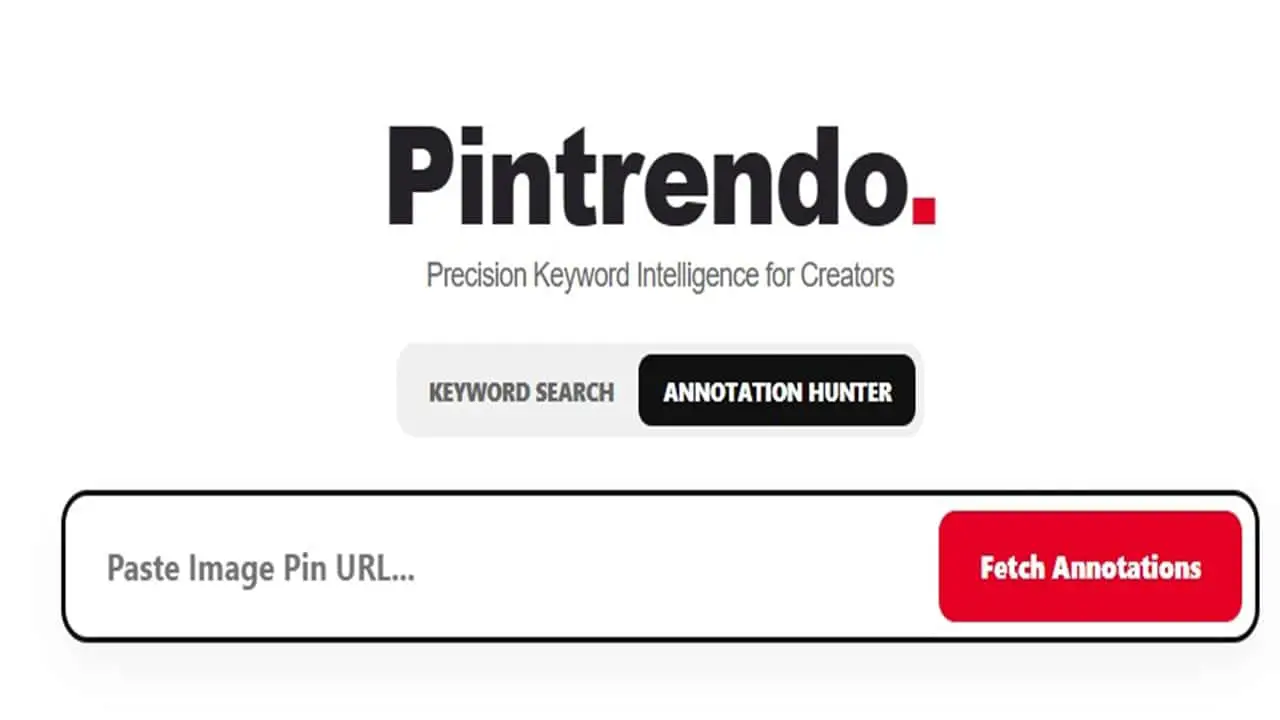
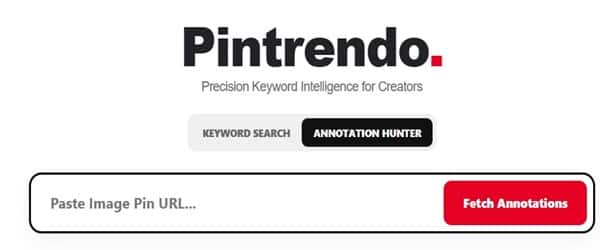
Step 2: Paste the URL into Pintrendo’s Annotation Hunter
Enter the pin URL.
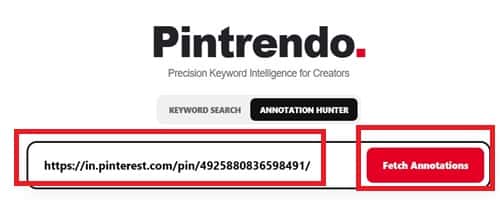
The tool will extract the annotations associated with that pin.
You’ll see words and phrases Pinterest connects to it.
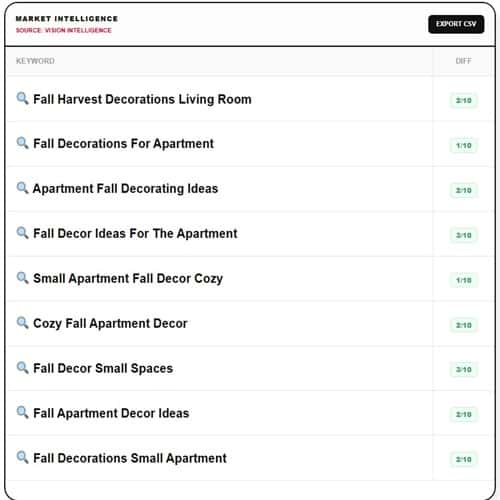
These are not random.
These are signals Pinterest believes are closely associated with the search query you typed.
Step 6: Repeat This for Top 3 Pins
This is key.
Do this for:
- Rank #1 pin
- Rank #2 pin
- Rank #3 pin
Now you’ll have three annotation lists.
Combine them.
You will start seeing overlapping words and recurring phrases.
Those recurring phrases are extremely important.
Because:
The annotations found in the top 3 ranking pins are what Pinterest believes are closely associated with your main search query.
This is how you understand topical depth.
What to Do With Those Annotations
Now that you have:
- Your main keyword
- Supporting autocomplete phrases
- Annotation phrases from top 3 ranking pins
You build your content.
How to Use Annotations in Your Blog Post
Naturally integrate:
- Overlapping phrases
- Closely associated terms
- Supporting context words
Do not stuff.
Instead:
- Use them in headings
- Use them in subtopics
- Use them in image alt text
- Use them in paragraph expansion
You are increasing contextual relevance.
How to Use Annotations in Pin Descriptions
This is where most people win or lose.
When writing your pin description:
- Include your main keyword once
- Include 3 to 6 supporting annotation phrases
- Structure it naturally
Example structure:
- Main keyword sentence
- Supporting context sentence
- Additional descriptive expansion
Pinterest reads phrase relationships.
When your description mirrors annotation patterns of top-ranking pins, you align with what Pinterest already understands as relevant.
Tip: Notice when you fetch annotations, there is a small search icon next to the queries identified under annotations, thats huge because when you click on it, it will open a whole new list of keywords meaning it will give you different keywords from side angles, literally allowing you to explore thousands of untapped keywords.
Why This Process Works
Let’s connect the dots.
Pintrendo helps you:
- Identify underserved search phrases.
- Validate ranking format on Pinterest.
- Extract contextual annotation signals.
- Reverse-engineer topical relationships.
- Publish content aligned with Pinterest’s interpretation of the query.
You’re not copying.
You’re understanding.
And there’s a difference.
Complete Workflow Summary
Here’s the full system in order:
- Enter seed keyword into Pintrendo.
- Select an underserved long-tail phrase.
- Go to Pinterest search.
- Type the exact phrase.
- Analyze ranking results.
- Copy URL of top pin.
- Run it through Annotation Hunter.
- Repeat for top 3 pins.
- Combine annotation lists.
- Identify recurring phrases.
- Write blog content using those phrases naturally.
- Write pin descriptions using those contextual signals.
This creates:
- Stronger relevance signals
- Better semantic alignment
- Higher ranking probability
- Sustainable Pinterest traffic
Final Thoughts
Pinterest doesn’t rank content randomly.
It ranks structured relevance.
Most creators stop at keyword research.
The real edge is combining:
- Autocomplete keyword discovery
- Validation inside Pinterest
- Annotation extraction from top-ranking pins
- Contextual integration into your content
Once I started doing this consistently, my Pinterest content stopped feeling like a gamble.
It became predictable.
That’s the difference between guessing… and using a system.